

Running HDMI to an outdoor TV involves two problems most guides skip: signal degradation over longer runs, and what happens to a standard HDMI cable when it is exposed to UV, moisture, and temperature swings for years. This article gives you the practical information to get it right the first time.
Standard HDMI Cables Are Not Rated for Outdoor Use
The jacket on a standard HDMI cable — the outer rubber or PVC sleeve — is not designed for continuous UV exposure or outdoor temperature cycles. Over 12 to 24 months outdoors without conduit protection, the jacket becomes brittle, cracks, and eventually allows moisture to reach the conductors. This degrades signal quality and eventually causes complete failure.
If you are routing HDMI cable through an open exterior space, you have two options:
- Use an outdoor-rated HDMI cable with a UV-stabilized, weatherproof jacket (look for "direct burial" or "outdoor-rated" in the product spec)
- Run a standard HDMI cable inside conduit — even basic PVC conduit protects against UV and moisture effectively
Either approach works. Conduit is usually cheaper and easier to source than specialty outdoor HDMI cables, especially for runs over 25 feet.
How Far Can You Run HDMI Before Signal Degrades
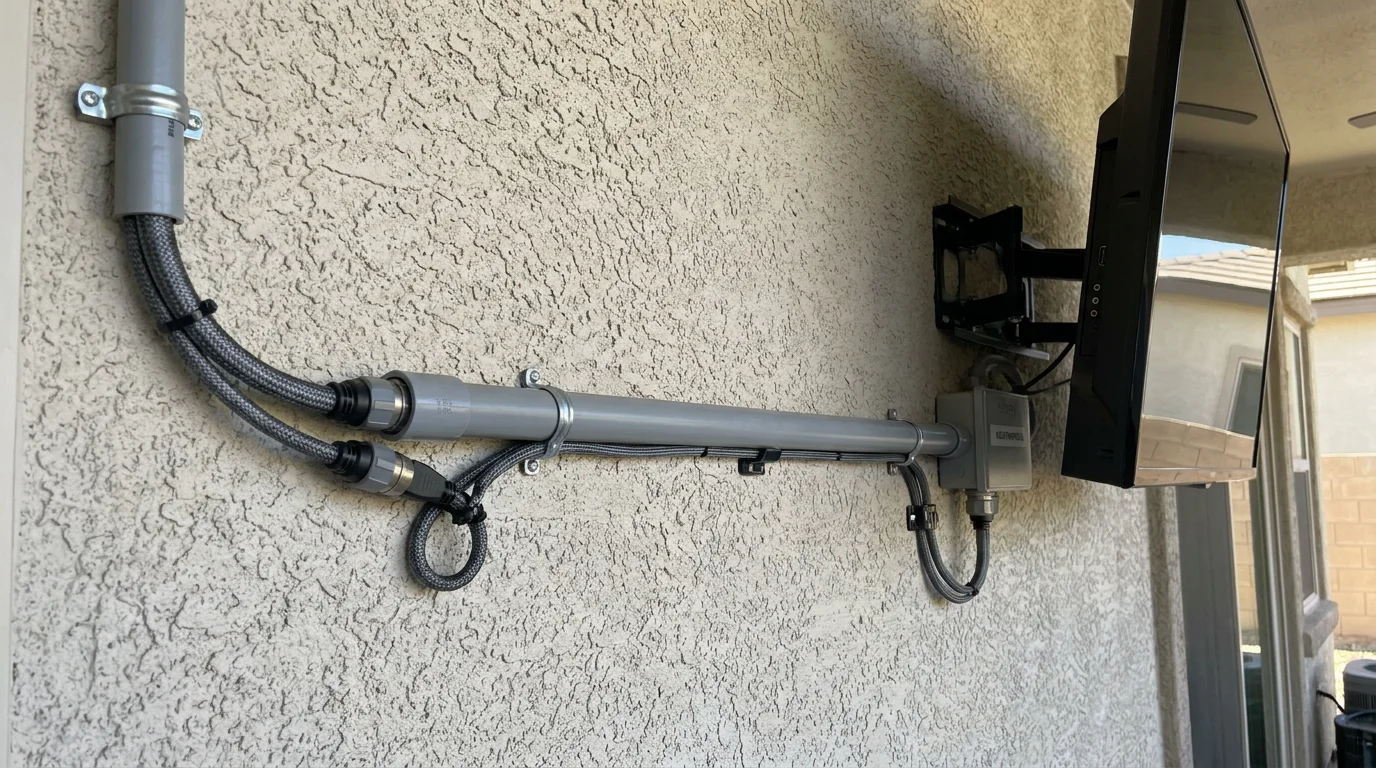
HDMI signal degradation is a real concern beyond certain distances. Standard copper HDMI cables reliably carry 4K HDR signals up to about 15 feet (5 meters). Between 15 and 50 feet, signal quality depends heavily on cable quality. Beyond 50 feet (15 meters), passive copper HDMI cables frequently produce intermittent signal loss, flickering, or no image at all (source: Cable Matters HDMI length guide, January 2026).
For outdoor installations where the source device (Apple TV, streaming box, cable receiver) is inside the house, runs of 25 to 60 feet are common. Here is what works at each range:
| Run Length | Recommended Solution | Approx. Cost |
|---|---|---|
| Under 15 ft | Standard high-speed HDMI cable in conduit | $15 – $30 |
| 15 – 50 ft | Outdoor-rated HDMI or standard cable in conduit; use 24AWG or thicker | $30 – $80 |
| 50 – 100 ft | Active HDMI cable (with built-in signal booster) or HDMI over fiber | $60 – $150 |
| Over 100 ft | HDMI extender over Cat6 or fiber (transmitter + receiver) | $80 – $200 |
HDMI 2.1 and Outdoor TVs
If your outdoor TV supports HDMI 2.1 (48Gbps bandwidth, required for 4K/120Hz or 8K/30Hz), confirm your cable is rated for HDMI 2.1 as well. Most cables sold as "HDMI 2.0" top out at 18Gbps and will bottleneck a 2.1 port. For outdoor TV use — where 4K/60Hz HDR is the practical ceiling — a standard HDMI 2.0 cable is sufficient for most content. HDMI 2.1 cables become relevant only if you are connecting a gaming console and plan to use high-refresh-rate modes.
The Simplest Outdoor HDMI Setup
For most homeowners, the cleanest solution is to skip a long HDMI run entirely: mount the streaming source (Apple TV, Fire Stick, Chromecast, or the TV's built-in smart system) directly at the TV, connect it to your home WiFi, and use WiFi for all content delivery. This eliminates the HDMI run completely and removes any signal degradation or weatherproofing concern.
The only reason to run a physical HDMI cable outdoors is when you specifically need a wired connection from a cable box, gaming console, or Blu-ray player that cannot be moved outside. In that case, the table above gives you the right approach for your run length.
Who Should Skip the Long HDMI Run
If your outdoor TV has a capable built-in smart platform (Google TV, Roku, or similar), a long external HDMI run is rarely necessary. Use the built-in streaming apps and a stable WiFi connection instead. The complexity and cost of a 50+ foot outdoor HDMI installation is not justified when the TV already streams every major service natively.
For installation guidance that covers the full outdoor TV setup process, see How to Install an Outdoor TV: A Step-by-Step Guide. For cable management ideas that keep the run clean after installation, see How to Hide Outdoor TV Cables: 4 Clean Solutions.

0 comments